
SongLab: presentation#
Version 1.0.0 for Android (iPhone version coming soon) and PC page, October 2026
🎤 SongLab is the notebook for songwriters. On your phone you write lyrics in colour-coded sections, see straight away which lines are too short or too long, record each part in time with the metronome and build the beat in the Studio. Can't play an instrument? Hum the melody and it becomes an instrument, already in the right scale. On your PC you carry on in a full FL Studio-style studio, linked to the phone with a QR code. No account and no ads.
1. What makes it different#
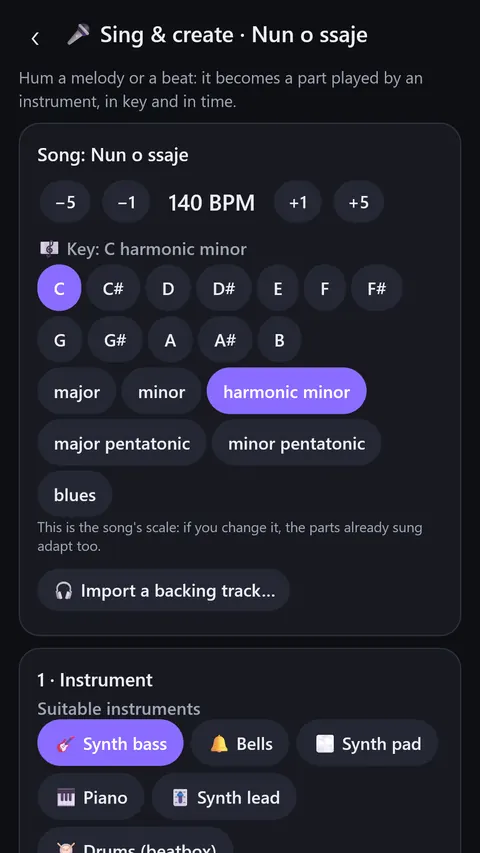
| 🎤 | You sing, it becomes music | Hum a melody: it becomes a part played by an instrument, in key and in time. Afterwards you edit it note by note; if you change the song's scale, it adapts by itself |
| 🥁 | Drums with your voice | "Boom" for the kick, "pa" for the snare, "ts" for the hi-hat: it becomes a real drum beat. If you like, the app learns how you make the sounds |
| 🎧 | Start from a backing track | Load a backing track of your own: the app detects its BPM and key and you sing over it |
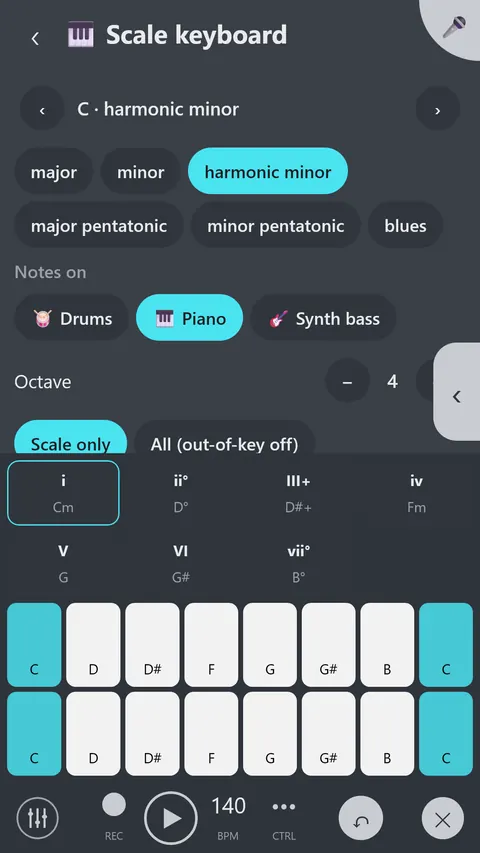
| ⌨️ | Play without wrong notes | The computer keyboard (or the phone's scale keyboard) plays only the right notes: chords with one hand, melody with the other |
| 📏 | Lyrics under control | Every line counted and coloured, syllables per bar, rhymes A B C and the best place to break the line |
| 📜 | A scrolling teleprompter | While you record, the lyrics scroll by themselves, with the line to sing always in view |
| 🎚️ | Every note in its place | For each note you choose how hard it plays, further right or left and a little higher or lower |
| 🎯 | Singing coach | It listens and tells you where you're out of tune or out of time, with exercises and progress |
| 🔗 | Phone and PC together | Just a QR code: no account, songs and recordings travel encrypted |
| 📱 | Everything on the phone | Write, record, compose and mix on the phone; the PC is there only if you want it. No ads |
2. Who it's for#
- ✍️ People who write lyrics (rap, trap, pop, neomelodico…) and want lines of the right length for the metre.
- 🎙️ People who sing and want to record verses and choruses in time, picking the best pieces of each take.
- 🎵 People who have a melody in their head but can't play it: they sing it and hear it played straight away.
- 🎹 People who make the beat and want to move from phone to PC without exporting and re-importing files.
- 👥 People who write and record as a group: the same song on several phones and PCs, each person with their own role.
3. The problem#
- The lyrics are in the phone's notes app, the recordings in the voice recorder, the beat in yet another app: nothing is connected.
- Counting the characters and syllables of every line by hand is slow, and shortening a line means losing the previous version.
- People who don't play an instrument have ideas in their head but can't turn them into music.
- PC studios are powerful but start from scratch: the lyrics aren't there.
4. The solution#
📱 On the phone#
| Feature | In practice | |
|---|---|---|
| 🔴 | Record now | One tap and you record the idea, which goes to Loose ideas |
| 🎼 | Ready-made genres and your own | Trap, Rap, Pop, Neomelodico, Reggaeton, R&B, Drill, Rock: sections, BPM and line length already set up, plus the genres you create yourself |
| 🌈 | Colour-coded sections | Verses, choruses, bridges… with icons; linked choruses change together |
| 🥁 | Metronome and tempo | TAP, accent, count-in; BPM with decimals too and time signature (4/4, 3/4, 6/8…); the click never ends up in the recording |
| 🎤 | Sing & create | Sung melodies and beatboxed drums that become played parts, from a genre or from a backing track |
| 🎹 | Scale keyboard | Chord pads and keys with only the notes of the key; record over the song, in loop passes too |
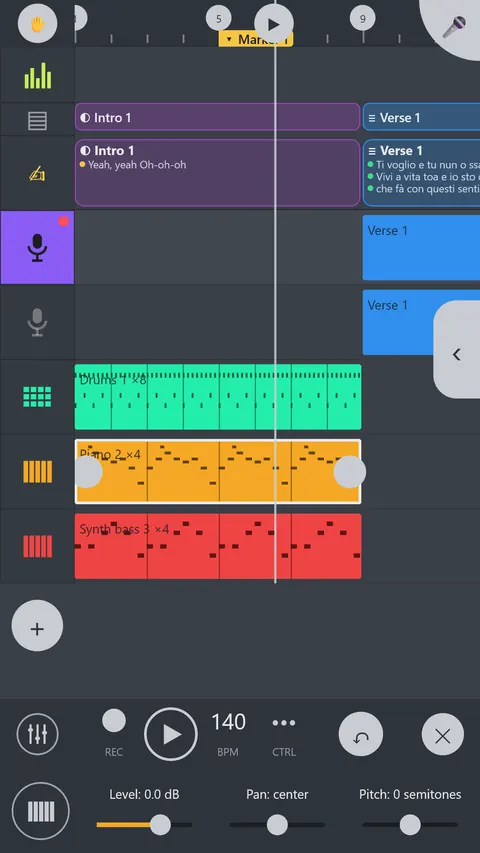
| 🎚 | Studio like FL Studio Mobile | Tracks, the Lyrics track, clips, step drums, piano roll, 13 instruments and your own samples, a mixer with meters and effects, also in landscape |
| 🔁 | Effortless takes | Loops, punch to redo a line, one take per pass and comping with the best pieces |
| 🎤 | Vocal effects | Pitch correction, double voice, harmonizer and more, also in your headphones while you sing |
| ⬇️ | Export and import | M4A, WAV, FLAC, separate tracks, MIDI (import too), lyrics as TXT, PDF and Word |
| 🕘 | Nothing gets lost | Undo gesture by gesture, history, versions with a backup every 10 minutes, deleted songs recoverable for 30 days, removed recordings that come back with ↶ |
🖥️ On the PC#
| Feature | In practice | |
|---|---|---|
| 🔗 | Linked with a QR code | Open the page, scan the QR code with your phone and your songs are there. Nothing to install |
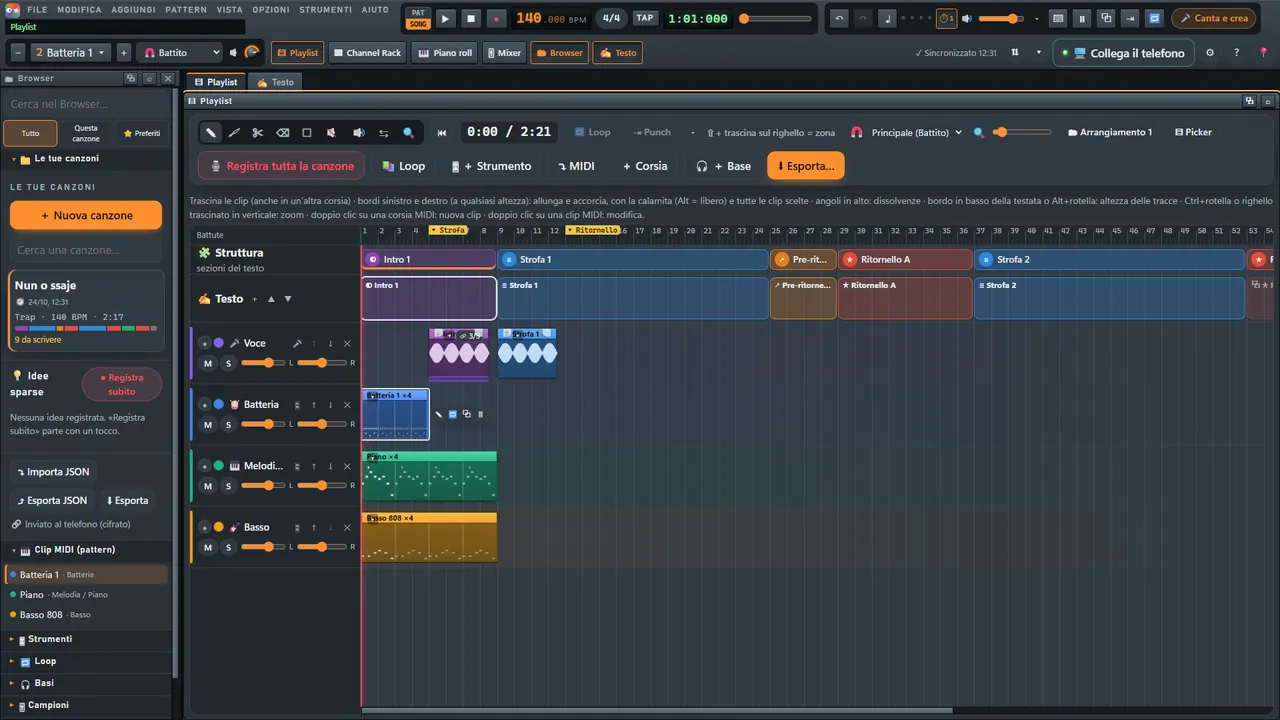
| 🗂️ | Like FL Studio | Menus, Browser, Playlist, Channel Rack, Piano roll, Mixer and the same shortcuts; Ctrl+K to search for any command by name |
| ⌨️ | Play with the keyboard | The computer keyboard in key: chords on the left, notes on the right, recording over the song |
| 🎤 | Sing & create | The same as on the phone, with the PC's microphone |
| 🎙️ | Safe recording | Several tracks at once, loop takes, punch with pre-roll, latency measurement; if the page closes halfway through, the take is recovered |
| 📦 | Complete exports | WAV up to 32-bit float, FLAC, MP3, M4A, Opus, separate tracks, MIDI, a printable song sheet |
5. Phone and PC together#
There's only one copy of each song: what you do on the phone shows up on the PC and vice versa, recordings included. If you change it on both, the changes are merged, and a version is always saved first so you can go back. A typical workflow: idea and lyrics on the phone → beat and mix on the PC → vocals with the teleprompter on the phone → final export from the PC.
👥 Collaborate: share the song with an invite link or QR code; everyone has a role (Co-writer, Singer, Musician, Mixer/Producer, Listener), changes are merged, and there are comments, activity and versions. All end-to-end encrypted.
6. Privacy#
- 🔒 No account, no ads, no analytics. Your songs live on your phone.
- 🔐 Only if you link the PC do songs and recordings go through the server, encrypted on the phone (AES-256): only the phone and the PC know the key. The copy on the server expires by itself after 30 days without updates.
- 🎯 The Singing coach analyses your voice only on the device: it never saves or sends the audio.
- 👥 In a collaboration the key is only in the invite link: the server sees sealed envelopes.
- 💬 Suggestions and bug reports are sent only when you send them yourself.
Details in the privacy policy.
7. At a glance#
| Platforms | Android; PC page in the browser (Windows, Mac, Linux); iPhone coming soon |
| Languages | Italian, English, Spanish, French, German, Portuguese, Chinese, Russian |
| Price | free, no ads |
| Account | none |
| PC page | autorobotcopilot.web.app/songlab/pc |